



Tired of Fighting Your Scheduling Software?
Reliability Your Production Team Can Count On
Steep learning curves, manual data entry, subscription costs, cloud dependency, and unreliable performance slow down production teams. SimpleStrips launches instantly, works offline, stays in sync, and handles last-minute changes without breaking your workflow.
Professional stripboards, call sheets, breakdowns, and production calendar sync in a fast, modern, reliable desktop app. Completely free during open beta. No subscriptions. No watermarks. Works 100% offline on Windows, macOS, and Linux. Instant import from Final Draft or Fountain. Drag & drop scheduling. Auto-updates across all documents.
When the beta ends, SimpleStrips will remain affordable and accessible, straightforward one-time pricing without recurring subscriptions or expensive per-seat licenses.
Intuitive Modern Interface
Learn in minutes, not weeks. The interface is clean, intuitive, and modern. Controls appear when you need them, stay out of your way when you don't. Drag and drop to reorder scenes. Click to edit details. Import your screenplay and get a complete stripboard in seconds. No hidden menus, no cryptic buttons, no 200-page manual.
Production-Speed Performance
Instant response, auto-updates, bulk exports. Import a 120-page screenplay and get a complete stripboard immediately. Smart sorting arranges your entire schedule in seconds. Generate production-ready PDFs with a single click. Fast enough to keep up with last-minute changes the day before your shoot.
Truly Free Open Beta
Full features, no limits, no hidden costs. Stripboards, call sheets, breakdown sheets, screenplay import, PDF exports, calendar sync. All free with zero restrictions. No feature gates. No 1-project caps. No watermarks. No trial period. Complete professional software at zero cost while we refine and improve it.
Stripboards, Calendar, Call Sheets, Breakdowns, DOOD Reports
Unlike tools that only handle one piece of the puzzle, SimpleStrips connects every step with true two-way synchronization: import your screenplay, arrange your stripboard, visualize your production schedule in calendar view, assign cast and crew, manage up to 10 production units, and generate production-ready PDFs. All without leaving the application. Change a location, cast assignment, or shoot date once, and it updates everywhere automatically across stripboards, calendars, call sheets, and all units. Drag a shoot day to a new date in the calendar and watch your stripboard rearrange instantly. Adjust call sheet times and see your calendar update. Add extras to a breakdown sheet and they appear automatically on your call sheets. That's the power of an integrated workflow.
Two Workspaces, One Unified Schedule
Automatically Synchronized With A Shared Workflow
Simple & Intuitive Stripboard
Drag & Drop Scheduling + Bulk Actions
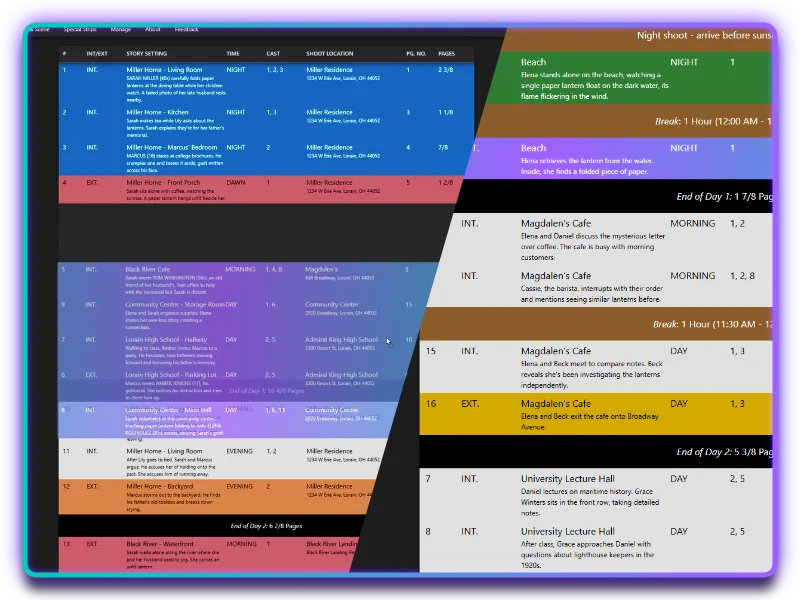
At the heart of SimpleStrips is a powerful, intuitive stripboard that puts you in control of your shooting schedule. Drag and drop strips to build your schedule visually. Each strip shows all the essential information at a glance: scene number, page count, cast, location, and description. Multi-select to move entire sequences at once. Add company moves, breaks, banners, and more to organize your schedule. Mark scenes for VO/ADR and track story day/night numbers for narrative continuity. The stripboard is designed to be fast, flexible, and easy to use so you can focus on crafting the best possible shooting schedule without fighting your software.
Drag & Drop Calendar
With Month & Week Views + Bulk Actions
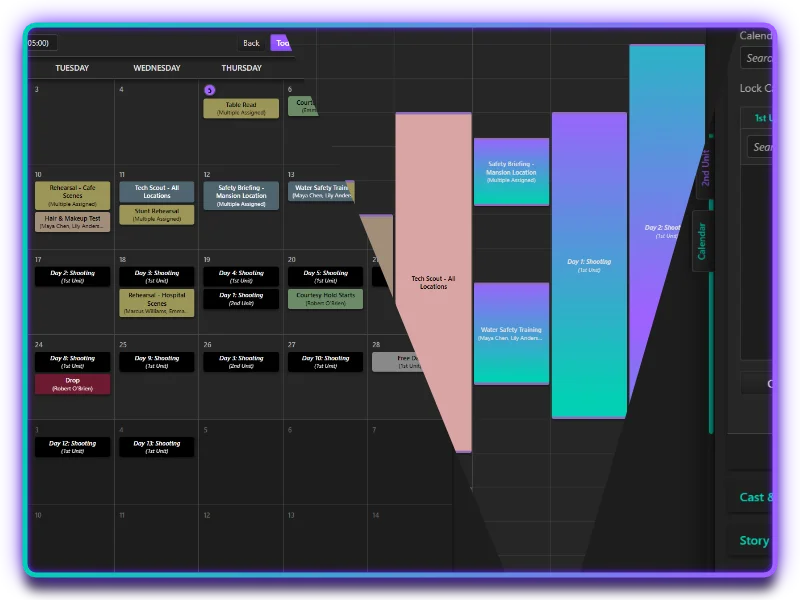
Visualize your entire production schedule with Google-Calendar-style month and week views featuring intuitive drag & drop functionality. Unlike competing software that offers separate project timelines, SimpleStrips provides true two-way sync. Drag a shoot day to a new date in the calendar and your stripboard updates instantly. Adjust shoot times or durations in calendar view and watch call sheets update automatically. Move strips in your stripboard and the calendar reflects changes immediately. Use marquee selection to move multiple shoot days at once. Create calendar-specific entries for rehearsals, fittings, tests, and production events with full timezone support. Set up recurring entries for regular production meetings or weekly deadlines. Track multi-day events like location holds and equipment reservations. Export your schedule to ICS format for sharing with crew and vendors.
Intuitive Dynamic Navigation
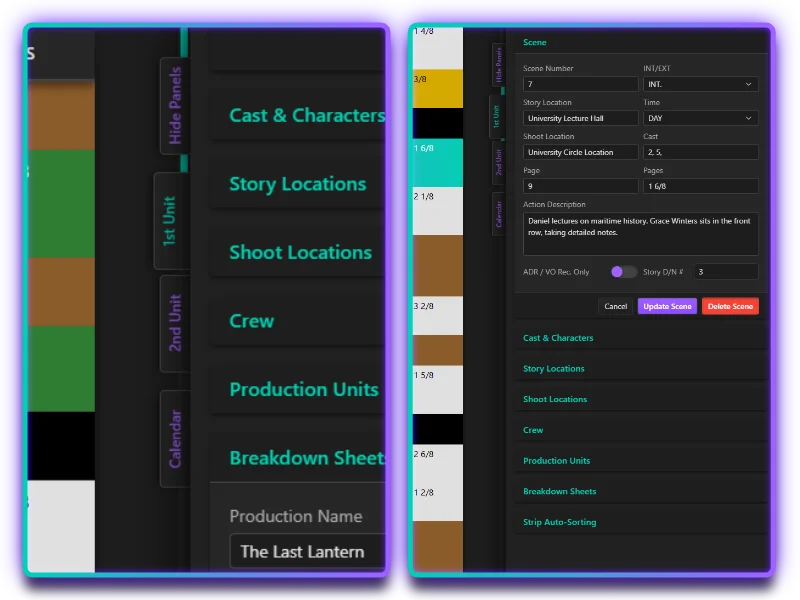
A simple tabs-based navigation system keeps your unit stripboards, calendar, and panel dock just a click away! The panel dock? It's your command center for managing characters, locations, breakdown details, and production data with project-wide synchronization. Never dig through menus or spreadsheets ever again.
Now here's where things get really powerful: at the top of the dock is the Dynamic Panel, the settings and information it displays is based on your selections in the active workspace. Select a scene (or even many) to edit its details, cast, and locations. Select a shoot day to adjust call times. The Dynamic Panel keeps the most relevant information and controls right at your fingertips, streamlining your workflow and eliminating the need to navigate through multiple menus or windows.
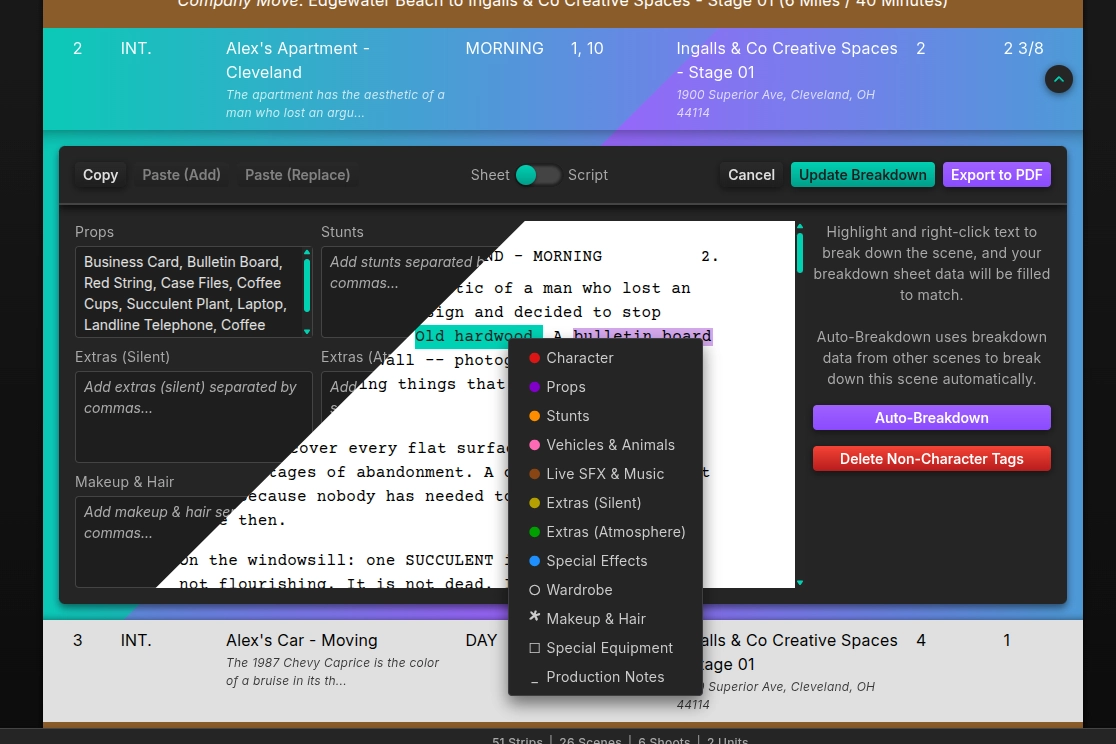
Fast & Easy Breakdowns
With Sheet & Script Views + Bulk Actions
The breakdown editor expands intuitively from a scene's strip: no separate windows, no context-switching. Enter items manually in the sheet view or switch to the script view and highlight entries directly. Either way, both views will synchronize their data live as you work! Already have a tagged script file? SimpleStrips finds and integrates those tags automatically on import. Add extras to a breakdown and they appear on the corresponding call sheets instantly. Built-in bulk actions and auto-breakdown features make it fast to reuse and cross-reference data across scenes.
Production-Ready Exports, Faster & Smarter Than Ever
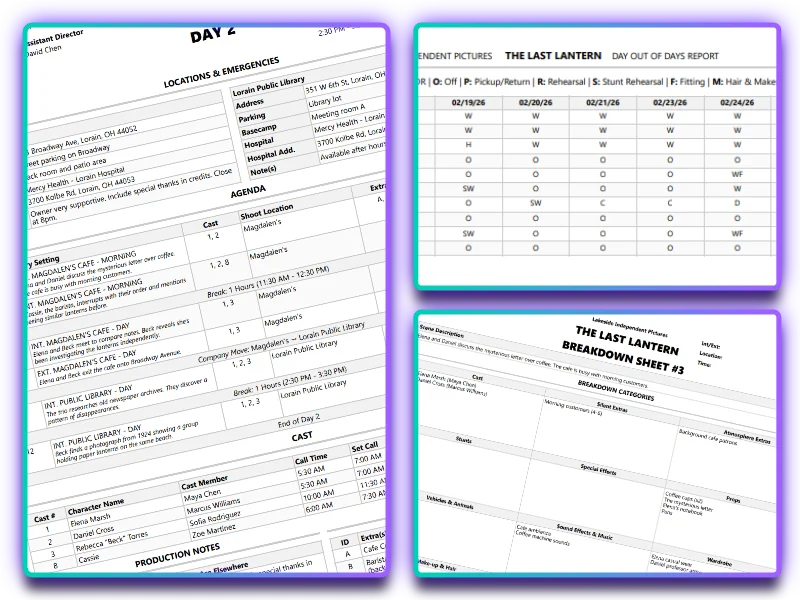
Breakdown Sheets
SimpleStrips exports breakdown sheets in clean, easy-to-read, industry-standard formatting. But that's not all; breakdown data dynamically links to related exports too! Extras added to a breakdown appear on corresponding call sheets automatically.
Smart Call Sheets
Call sheets automatically grab cast, crew, extras, locations, notes, times, and agenda details from your project. But you keep full control: bulk-edit sheets or customize individual ones in the dynamic panel. Choose single-sided or traditional call sheet layouts. Set weather, sunlight times, and more!
2-Click DOOD Reports
Generate comprehensive and accurate DOOD reports with just two clicks! SimpleStrips automatically compiles all the necessary data from your project.
Endlessly Powerful Features, Without Any Clutter
Maximum Flexibility to Work The Way You Want
Perfect Privacy & Security
Your projects stay on your machine. No cloud uploads. No account required. You own your .SimpleStrip project files and all exported documents. Work offline anywhere, anytime. Your creative work remains completely private and offline.
Seamless Screenplay Import
Import Final Draft (.fdx) or Fountain (.fountain) files and get a complete stripboard in seconds. SimpleStrips automatically extracts every scene, identifies characters, grabs page counts, and builds your stripboard, ready for scheduling immediately. No manual scene entry. No copying and pasting from your script.
Robust Undo & Redo
Complete undo/redo history with standard keyboard shortcuts across all workspaces. Deep history depth gives you confidence to experiment with schedule changes. Made a mistake? Undo it. Want to try a different arrangement? Undo and try again. Your work is never lost, and you can explore scheduling options without fear of breaking things.
Extensive Problem Flagging
The status bar's Problems Panel catches issues before they reach set: missing or incomplete call sheets, timing conflicts, double-booked cast or crew, incomplete breakdowns, missing contact info, and dozens more production-specific warnings across all units. Fix problems in prep, not on the day.
Multi-Unit Support
Manage complex productions with up to 10 independent shooting units in a single project file. Coordinate Main Unit, Second Unit, Splinter Units, and specialty crews with separate stripboards, schedules, and crew lists, or enable crew sharing to pool resources across units. Switch between unit stripboards instantly while maintaining unified production calendar for a birds-eye-view.
Strip Auto-Sorting
Build a practical shooting schedule instantly with a powerful sorting engine that considers day lengths, locations, cast availability, story continuity, page counts, and more. Multiple configurable rules can be combined, disabled, and reordered by priority. Automatic turnaround enforcement (12-hour default) and break insertion keep schedules realistic and crew-friendly.
Cast & Crew Management
Store assignments, roles, contact information, notes, and more for cast and crew members. Mark core crew for auto-assignment to every shoot day (with manual per-day overrides). Automatic cast numbering handles additions and deletions cleanly while allowing manual assignments. Your database stays consistent and shared across all workspaces and features, with up to 10 production units per project.
Smart Location Management
Link story locations to real-world filming locations dynamically. When "Coffee Shop" is shot at Magdalen's in Lorain, "tie" them and all the scene strips update automatically. Change your mind later? Un-tie and reassign instantly. Sort by story location to group narrative sequences, or by shoot location to minimize company moves.
Story Day/Night Tracking
Track narrative continuity with story day/night numbering separate from shoot days. Story Days are automatically used by Auto-Sorting features and integrated into Call Sheet agendas and Breakdown Sheets. Critical for maintaining wardrobe, makeup, and prop continuity across complex multi-day narratives.
ADR & VO Scene Flagging
Mark scenes requiring ADR (Automated Dialogue Replacement) or VO (Voice Over) with dedicated indicators. Scene flags automatically sync across your stripboard, calendar workspace, and call sheets. See ADR/VO scenes clearly marked throughout your production workflow. Essential for post-production planning and production audio coordination.
Walkie-Talkie Management
Assign industry-standard department-specific walkie-talkie channels on your call sheets. Assign all crew to channel 1 for smaller productions, or disable walkie-talkie channels entirely. There's even a toggle for NY/NJ channel conventions. Channel assignments appear on call sheets automatically.
Active Development
Unlike decade-old legacy software, SimpleStrips is actively developed by working filmmakers based on real user feedback (there's even a feedback button directly in the app), becoming more powerful and more intuitive with every update. The software is production-tested stable: it won't crash during critical scheduling work. SimpleStrips evolves with your production needs.
How SimpleStrips Compares
SimpleStrips delivers the reliability, speed, and modern workflow that production professionals and next-generation filmmakers need.
| App | SimpleStrips | MovieMagic | StudioBinder | Excel | Yamdu | Gorilla |
|---|---|---|---|---|---|---|
| No Subscription | ✓ | ✗ | ✗ | ✗ | ✗ | ✗ |
| Inexpensive | ✓ | ✗ | ✗ | ✗ | ✗ | ✗ |
| Screenplay Import | ✓ | ✓ | ✓ | ✗ | ✓ | ✓ |
| Call Sheets | ✓ | Manual | ✓ | Manual | ✓ | ✓ |
| Works Offline | ✓ | ✓ | ✗ | ✓ | ✗ | ✓ |
| Data Stays Local | ✓ | ✓ | ✗ | ✓ | ✗ | ✓ |
| Runs Well | ✓ | ✗ | ✓ | ✓ | ✓ | ✓ |
| Modern UI | ✓ | ✗ | ✓ | ✓ | ✓ | ✗ |
| Intuitive UX | ✓ | ✗ | ✓ | ✗ | ✓ | ✗ |
| Calendar Workspace | ✓ | Month View | Gantt Chart | ✗ | Gantt Chart | Month View |
| Calendar/Stripboard Sync | ✓ | ✓ | One-Way | ✗ | ✗ | ✗ |
| Smart Auto-Sort | ✓ | Basic | ✓ | ✗ | Basic | ✗ |
| Problem Flagging | ✓ | Partial | Partial | ✗ | ✗ | ✗ |
| Multi-Unit Support | ≤ 10 | ≤ 4 | ✗ | ✓ | ✗ | ✗ |
| Breakdown Sheets | ✓ | ✓ | ✓ | ✓ | ✓ | ✓ |
| Script Tagging | ✓ | ✗ | ✓ | ✗ | ✓ | ✗ |
| Import Tagged Scripts | ✓ | ✗ | ✓ | ✗ | ✗ | ✗ |
| Auto-Breakdown | ✓ | ✗ | ✗ | ✗ | Partial | ✗ |
| DOOD Reports | ✓ | ✓ | ✓ | ✗ | ✓ | ✓ |
| PDF Export | ✓ | ✓ | ✓ | ✓ | ✓ | ✓ |
| ICS Calendar Export | ✓ | ✗ | ✓ | ✗ | ✗ | ✗ |
| Linux Support | ✓ | ✗ | Browser | Browser | Browser | ✗ |
| No Bloat | ✓ | ✗ | ✗ | ✗ | ✗ | ✗ |
Cloud-Only Platforms
Cloud platforms trap your data. If you stop paying the monthly fee, you lose edit access to your own work. If the WiFi goes down on the location scout, you're locked out. SimpleStrips is 100% offline. Your files live on your drive, forever. No subscriptions. No cloud dependency. Your work is yours to keep, edit, and export.
Legacy Desktop Software
Industry veterans are tired of "standard" software demanding monthly subscriptions while constantly crashing with an interface that's straight out of the '90s. You shouldn't have to pay rent for software that acts like it's abandoned. SimpleStrips is built on the same modern architecture behind WhatsApp, 1Password, and Slack.
Spreadsheets
Spreadsheets mean endless manual work: repetitive data entry, copy-pasting information across multiple sheets, and zero automation when production details change. SimpleStrips eliminates the busywork with intelligent linking. Update a location or cast assignment once and watch it cascade everywhere instantly. Your time is worth more than fighting spreadsheets.
What's Next?
SimpleStrips is under active development, continuously refined based on user feedback. Each update makes it more intuitive and more powerful for real day-to-day production work.
The next major beta release (v0.9.0) will introduce the Constraints workspace: a powerful visual environment for mapping and automating every scheduling restriction your production must work around, from location conflicts and cast availability to union rules and equipment limits.
But SimpleStrips is just the beginning. We're building a complete suite of production tools designed to work together seamlessly, bringing power, simplicity, and beauty to every step of your filmmaking workflow.
We're developing SimpleShots, a dedicated shot list and storyboard application that integrates seamlessly with your stripboard workflow. SimpleShots will import your SimpleStrips project files and automatically organize shot lists by each shoot day's schedule, ensuring visual planning stays synchronized with your production plan.

Simple Suite delivers software solutions that honor both the craft of production and the principles of timeless design. Built by filmmakers for filmmakers, Simple Suite applies the same precision Cleveland brings to all its finest work from manufacturing to creative industries, backed by 400 years of American excellence.
Priced Like Fade In Pro
When the beta concludes, SimpleStrips will launch with two versions:
SimpleStrips LITE
Always Free. All Features Included.
Watermarked Exports. Reminders to Upgrade.
SimpleStrips
No Limitations. No Monthly Rent. Accessible Pricing.
Ready to Simplify Your Production Scheduling?
The professional tool designed for real production workflows, completely free during open beta.
100% free • Full features • Offline • Windows, macOS & Linux